
Recording Transfers Involving Manual Accounts
Record transfers between manual accounts or involving a manual account without duplicating transactions or counting income or expenses.
A transfer between your own business accounts moves money; it is not income or an expense. Record a transfer records money you have already moved.
Important: this feature does not send money between banks. Move the funds through your financial institution, then record the movement in Fynance. Use this flow when at least one account is manual.
Before you start: avoid duplicate transactions
Check whether the money-out and money-in entries already appear in Fynance:
| Situation | What to do |
|---|---|
| Neither side has been recorded and at least one account is manual | Use Record a transfer at the top of Transactions. |
| One side already exists | Open that transaction and create only the missing side. |
| Both sides already exist | Open one transaction and link the other without creating a new entry. |
Connected accounts import their activity, and Fynance can suggest links between the two sides. Check imported transactions before creating a manual record.
Record a transfer between manual accounts
- Open Transactions.
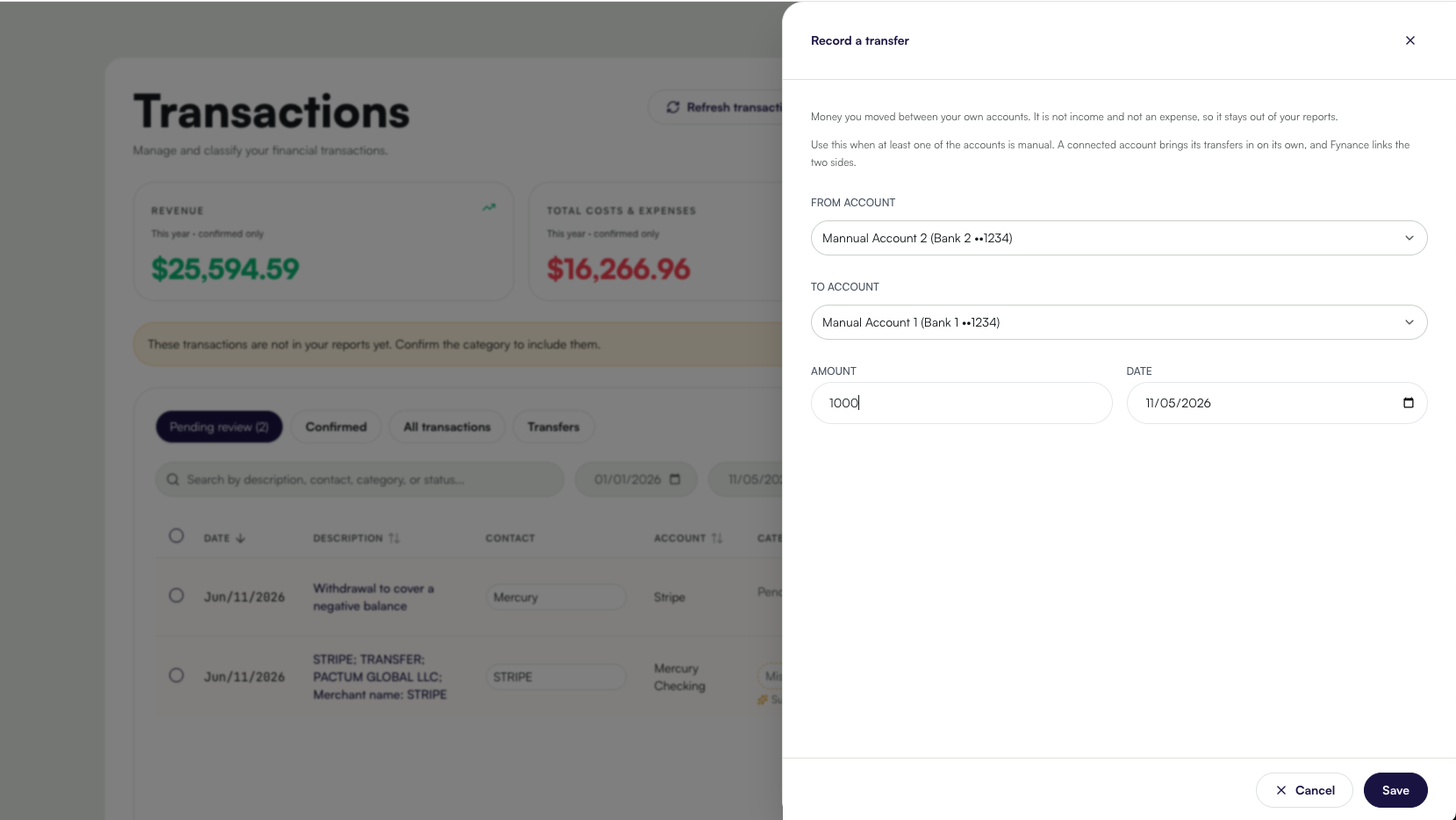
- Click Record a transfer at the top right.
- Choose the account the money left under From account.
- Choose the account that received the money under To account.
- Enter the Amount and Date of the movement.
- Review the details and click Save.
Document example: $1,000 moves from Manual Account 2 to Manual Account 1 on November 5, 2026. Replace these example values with your own transfer details. The US-formatted date on screen is 11/05/2026.
When one side already exists
If the outflow or inflow already appears in Fynance, do not record the transfer again using the button at the top.
- Open the existing transaction's details.
- Click Record a transfer at the bottom of the panel.
- Choose whether to create the missing side or link another existing transaction, as explained below.
Option A: create the missing side
Use this option only when the movement in the other account has not been recorded.
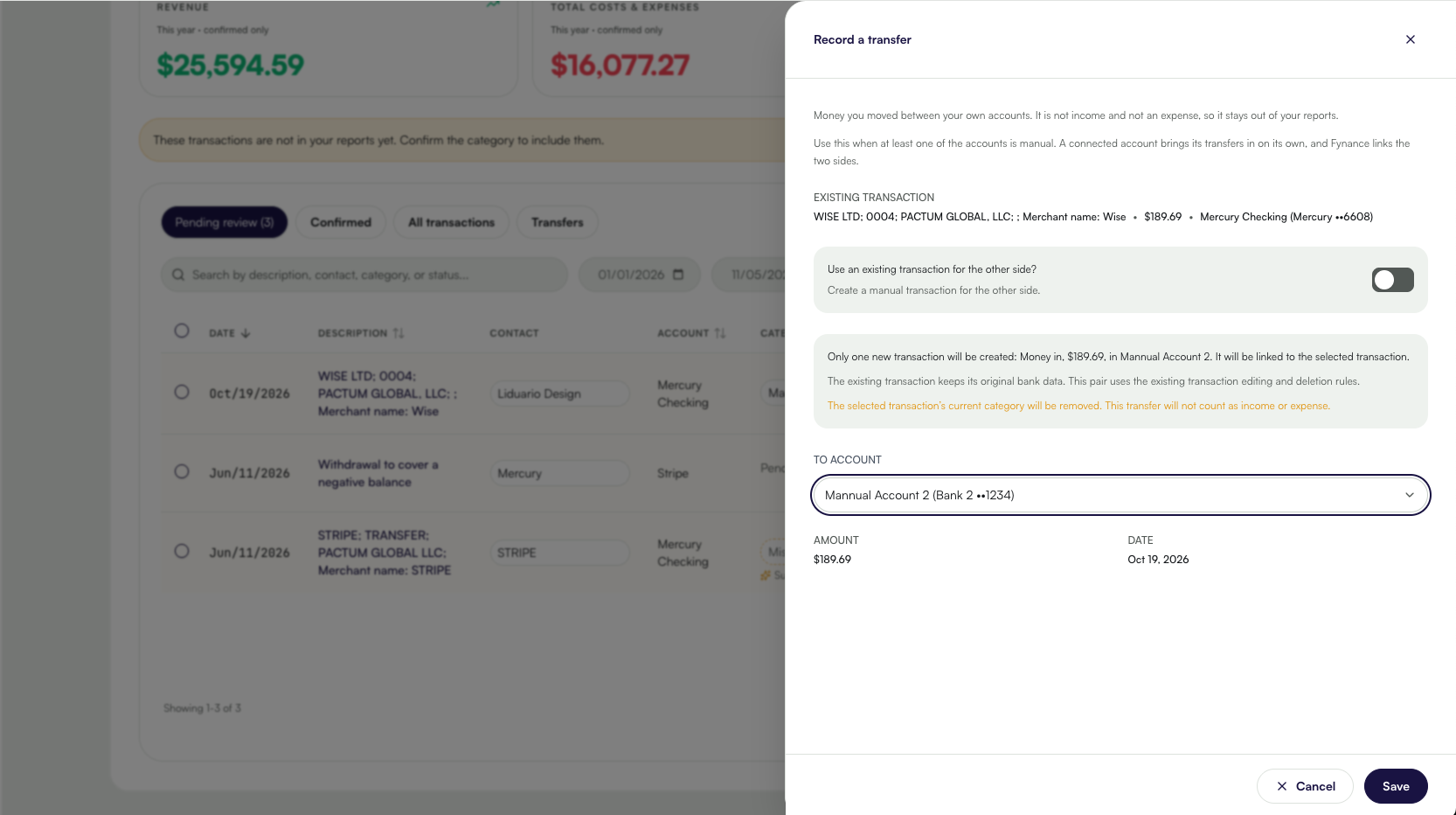
- Leave Use an existing transaction for the other side? switched off.
- Select the other account. For an existing outflow, select the destination under To account; for an existing inflow, select the source under From account.
- Check the amount and date.
- Click Save.
Document example: a $189.69 outflow from Mercury Checking already exists. Selecting Manual Account 2 as the destination creates only one new $189.69 money-in entry in that account and links it to the existing outflow.
The existing transaction keeps its original bank data. Its current category is removed because the transfer must not count as income or an expense.
Option B: link two existing transactions
Use this option when both the outflow and the inflow already appear in Fynance.
- From one transaction's details, click Record a transfer.
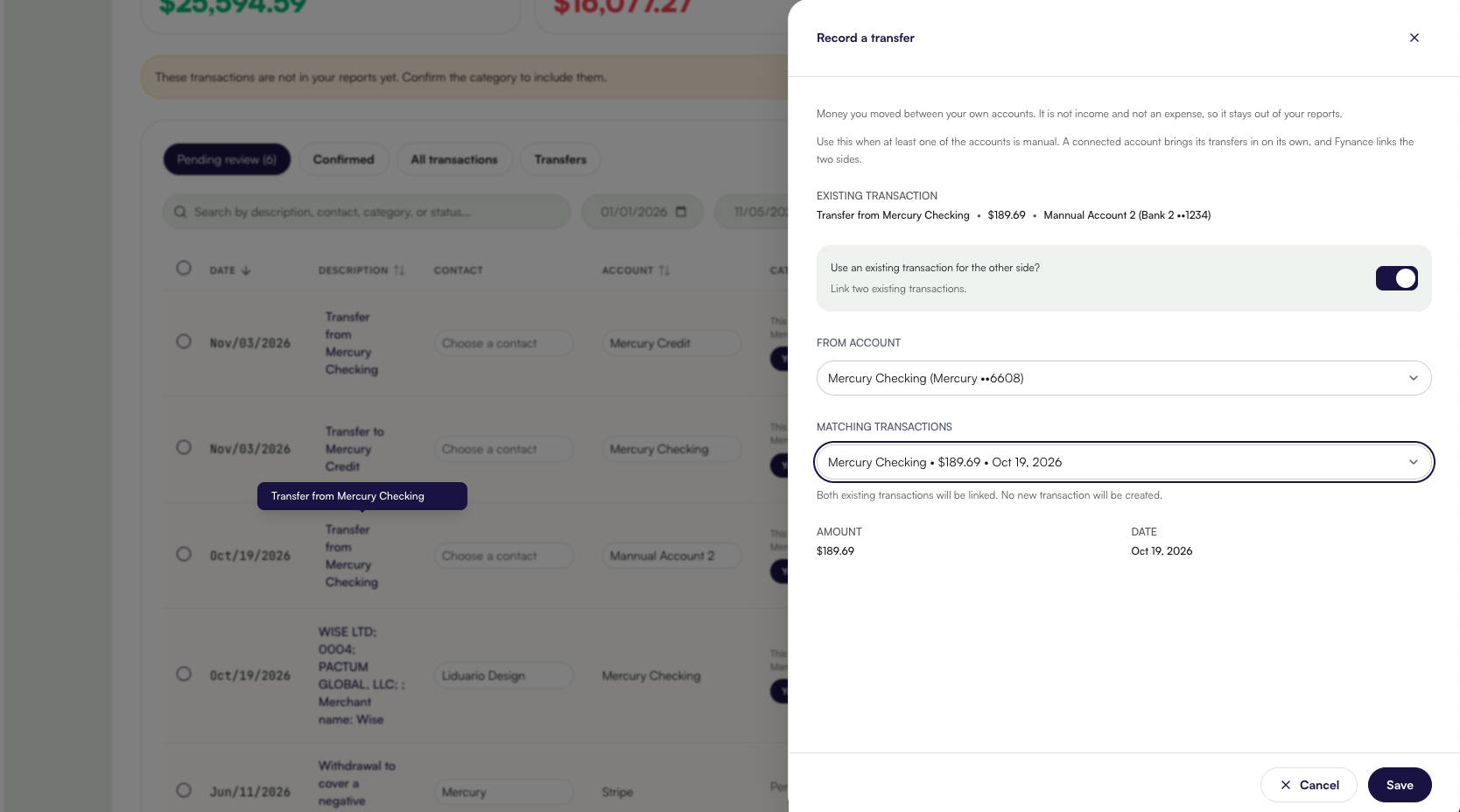
- Switch on Use an existing transaction for the other side?.
- Select the other account.
- Choose the corresponding entry under Matching transactions.
- Check the account, amount and date, then click Save.
Fynance links the two existing transactions without creating a new one. In the example, the $189.69 inflow in Manual Account 2 is linked to the Mercury Checking outflow dated October 19, 2026.
Options A and B are alternatives. Choose only the option that matches the records you already have.
Check the saved transfer
Open Transfers and find the movement. Check its source account, destination account, date and amount. Use search, the date range and the account filter to locate it.
For the $1,000 example, the Linked column shows Recorded in Fynance.
Review transfer suggestions
Fynance can also show suggestions in Pending review. Compare the suggested accounts with the actual movement of money:
- Click Yes if the suggestion is correct.
- Click No if it is incorrect.
The $150 and $189.69 suggestions in the document are separate examples, not extra steps for the $1,000 transfer.
Final checklist
- Both accounts belong to your business.
- At least one account is manual in this flow.
- The amount and date match the actual movement.
- You have not created a new transaction for a side that already existed.
- The movement is recorded as a transfer, not income or an expense.
If a transfer is waiting for its other side, see Transfers Awaiting Their Pair.